Nifty review: the AppSumo lifetime deal deserves a look if your team loses time chasing client approvals, locating the latest file and working out who owns the next task. Nifty brings those activities into a project workspace. The buying decision depends less on how many views it offers and more on whether its seat, portal and storage allowances match the way your business delivers work.
My verdict: shortlist it for a small agency or service team with a repeatable delivery process. Start with one representative project before migrating everything. This article reviews Nifty the project-management platform at niftypm.com, with a focus on the current AppSumo offer.
Check Nifty’s current AppSumo price and plans →
What is Nifty project management?
Nifty is a work-management platform combining tasks, roadmaps, documents, discussions and project reporting. Its current positioning also includes client portals and connections to AI assistants. The useful idea is to keep the brief, work, decision and next action close together, instead of scattering them across email, chat and several separate documents.
For example, a website redesign can stall even when the designer finishes on time. The client has not approved the mobile layout, the account manager cannot find the final logo, and the developer receives feedback without knowing which version it refers to. A project tool helps only when the team uses it to record those dependencies and decisions consistently.
Watch the AppSumo Nifty demonstration
The embedded video comes from the current Nifty AppSumo listing. Use it to see the product presentation, then check the written plan table for capacity and feature access.
Nifty AppSumo pricing and allowances
The live offer showed the following first four code levels when checked. Prices are in US dollars; confirm taxes, currency conversion and the current checkout total.
| Purchase | Price checked | Team members/guests | Portals | Storage |
|---|---|---|---|---|
| 1 code | $98.10 | 3 | 3 | 100 GB |
| 2 codes | $196.20 | 6 | 6 | 200 GB |
| 3 codes | $294.30 | 9 | 9 | 500 GB |
| 4 codes | $392.40 | 12 | 12 | 600 GB |
The current table shows native forms excluded from the first three levels and included at four codes. Do not assume every advertised feature is included at the entry price. The terms allow stacking up to ten codes, require redemption within 60 days and name future Business Plan updates. AI templates are limited to 20 per workspace per day.
A useful capacity calculation starts with people who need workspace access. A founder, designer and developer could already use a three-person allowance before adding a collaborator as a guest. Portal access is a separate concept. Confirm how each person will participate instead of treating all external clients as either free seats or paid members.
Storage deserves the same attention. Design files, video drafts and duplicated client assets can grow much faster than written tasks. Estimate the active material you need to keep in the workspace, decide where approved originals live and check the export process before making Nifty your only record of project work.
Client portals: the most practical reason to consider it
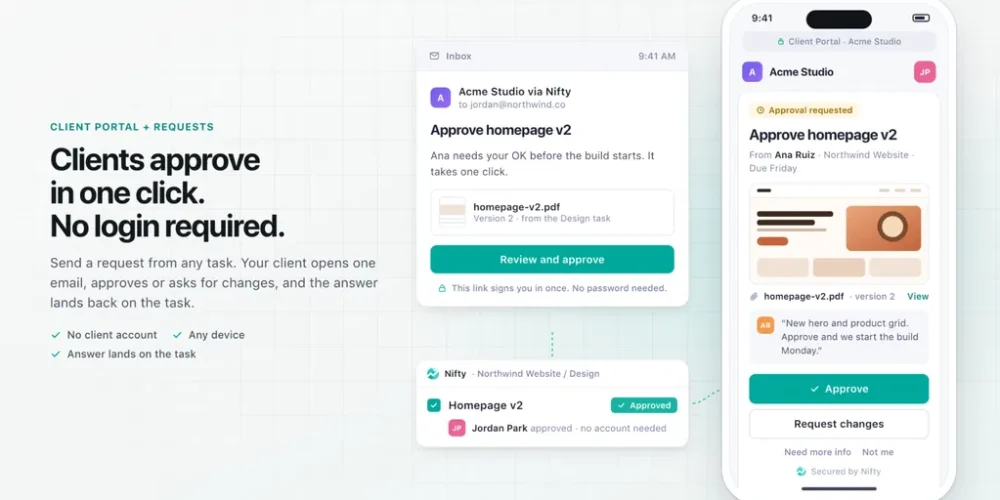
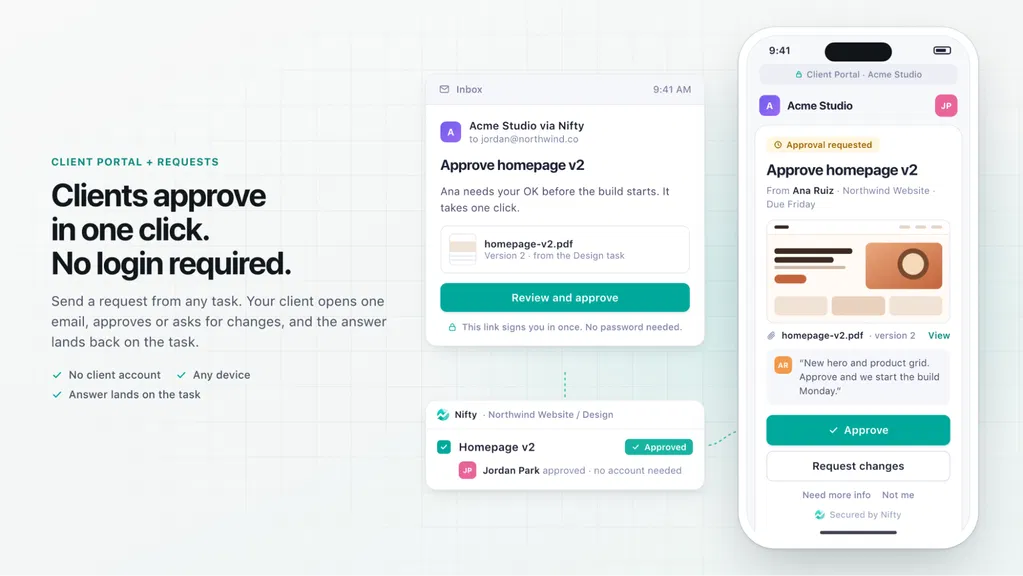
The official client-portal page describes secure email links that let clients respond without creating a Nifty account. Requests can cover approvals, answers and missing files, with responses returned to the relevant task. The vendor also describes choosing what a client can see, while keeping internal discussion separate.
That could remove a common source of friction: persuading a busy customer to learn your internal project tool just to approve one design. But I would test the experience from the client’s side. Is the requested decision clear? Can they find the right version on a phone? Does their answer give the team enough information to proceed?
For a stock-image shortlist, for instance, put the intended placement and the preferred crop alongside each candidate. Approval should cover the actual design decision, while your team separately checks usage rights. My Depositphotos review explains the credit and licensing considerations for one stock-media option.
Roadmaps and workload planning need good inputs
Nifty’s different task views and milestone structure can help a team see both the next action and the larger deadline. The value comes from realistic dates, clear ownership and visible dependencies. A colour-coded board will not fix a project in which every item is marked urgent and nobody has estimated the work.
For a small agency, I would define a short set of statuses: ready, in progress, waiting for client, waiting for internal review and complete. Separate waiting from active work. Otherwise a task that has been sitting with a client for a week can look like a delivery failure by the person assigned to it.
Workload planning is most useful when you agree what the numbers represent. Hours estimated, hours logged and a person’s available capacity answer different questions. Review those assumptions with the team before using a workload chart to promise another client a delivery date.
AI agents and MCP: useful potential, separate evaluation
Nifty’s Agent Hub information describes connecting compatible assistants to projects and maintaining context across people and agents. It also describes permissions and approval rules that control what a connected assistant can do. These are vendor-described capabilities, rather than results I have verified through a live integration.
Start with a limited internal task, such as drafting a status summary from a clearly defined project. Check whether it references the correct tasks, preserves important qualifications and leaves a useful record. Keep a person responsible for deadlines, promises to clients and final delivery decisions.
The presence of bring-your-own-key support should not be read as unlimited free AI usage. Budget separately for any connected provider or subscription you use, and confirm how access is granted and revoked. A successful connection is the beginning of the evaluation, not evidence that the assistant understands your entire business.
A one-week pilot I would run before migration
- Choose one typical project. Avoid both the easiest internal checklist and your most sensitive client account.
- Define a complete result. Write the deliverable, owner, review stage and acceptance criteria so the team knows what “done” means.
- Recreate the real collaboration. Add the people who actually work on it and test the permissions each role needs.
- Send one representative approval request. Ask a colleague to experience the client side and report any confusion.
- Check reporting and handover. Make sure someone joining mid-project can understand the latest decision without asking the original owner.
- Test retrieval and export. Confirm you can recover the records and files your business needs to keep.
At the end of the pilot, compare the coordination effort with your existing workflow. Count practical outcomes: fewer requests for the latest file, faster approval turnaround or clearer handovers. The aim is a better process for the team, not a larger collection of software subscriptions and lifetime licences.
Pros, limitations and who should buy
- Potential advantage: tasks, supporting material and decisions can stay together.
- Potential advantage: account-free client responses may make approvals easier.
- Potential advantage: a prepaid licence can suit a stable small-team setup.
- Limit: seat, portal and storage allowances still constrain the purchase.
- Limit: forms require a higher code level in the reviewed offer.
- Limit: migration and team adoption take work regardless of licence price.
- Unverified: I have not measured integration reliability, performance or support responsiveness.
I would shortlist Nifty for a service team whose bottleneck is coordination and approvals. I would be more cautious if you already have a well-adopted project system and cannot identify what would improve. Switching tools can disrupt a working process even when the new price looks attractive.
Alternatives: compare the workflow, not just the monthly bill
Include your current system in the comparison, alongside tools such as Asana, ClickUp or Monday.com. Run the same pilot brief through the options you are considering and price the access your actual team needs. Do not compare an entry-level lifetime allowance with an unrelated unlimited subscription and assume the saving is meaningful.
Nifty also publishes direct subscription pricing. Those plans have their own capacities and billing terms, so use them as a separate alternative rather than assuming the AppSumo offer mirrors every detail. If your main problem is selling and delivering a digital course, my FlexiFunnels review covers a different part of that workflow: pages, checkout and course delivery.
Frequently asked questions
Is Nifty a project-management tool or an AI assistant?
The core product is a work-management platform. Its newer AI integrations connect assistants to project context; they do not replace the need to organise the work and assign responsibility.
Do clients need their own Nifty accounts?
The vendor describes portal responses through secure email links without an account. Distinguish that experience from adding someone as a workspace member or guest, and verify the allowance for your setup.
Should I buy extra codes now?
Only for capacity or features you can justify. Count the people, portals and storage you need, check the live stacking terms and confirm how an existing purchase would be upgraded.
My final Nifty verdict
Nifty is worth investigating when client feedback, task ownership and project context are spread across too many places. The AppSumo offer can be appealing for a small team with predictable needs, but the right code level depends on more than headcount. Test one real project, verify access and approvals, and buy for a process your team will actually use.
See Nifty’s live AppSumo offer and code limits →
Sources: current AppSumo listing and deal terms, Nifty’s official website and the official portal, Agent Hub and pricing pages linked above. Checked 23 November 2026.